
FAQ
Answers to common setup, styling, and rendering questions
Can I import v2 over v1?
No. To upgrade from v1 to v2, see the migration guide.
How do I open Styler?
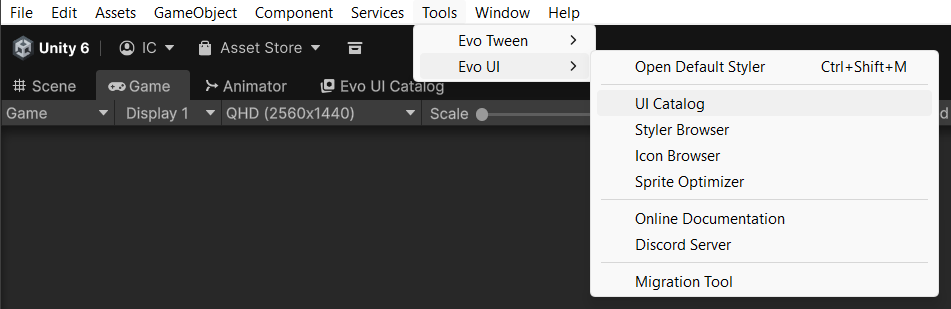
Open Tools -> Evo UI -> Styler Browser to manage presets. Tools -> Evo UI -> Open Default Styler opens the configured default asset.
Why does a Scene view click select a different object?
Evo UI makes clicks on UI select the topmost graphic that is drawn under the cursor, instead of an empty container or an invisible hit area. Click again to cycle through the other objects under the cursor. To use Unity's default picking, turn off Tools -> Evo UI -> Pick Visible UI in Scene View. See Scene View Picking.
Why does a color keep changing back?
A Styler Object or the component’s own Styler mapping may be applying the preset again. Change the preset entry for a shared change. For a local change, enable the relevant custom-color option, use StyleProvider.Custom, or choose a custom color mode on the Procedural Shape layer. Disabling one color mapping does not disable every other kind of styling.
How do I change button state colors?
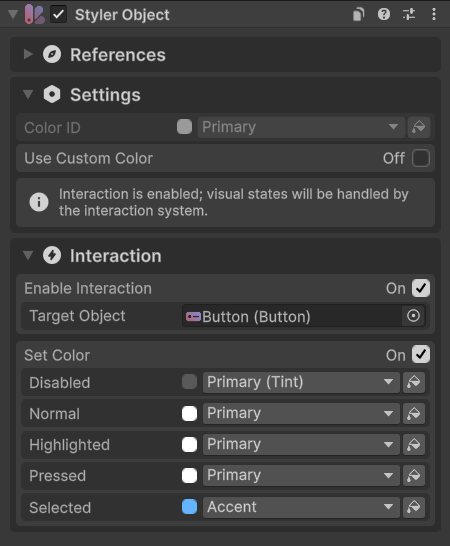
Configure Styler Object interaction, or use Procedural Shape’s per-layer Styler mappings. Interactive supplies the current state. Its old CanvasGroup state transitions are no longer used.
How do I change corner radius?
Select the background’s Procedural Shape and adjust its radius settings, or edit the Shape Style that owns them. Use independent corners for a rectangle with different radii. Sliced Images still have their normal Unity settings, but the supplied v2 controls use Procedural Shape for their main graphics.
Why does Backdrop Blur miss the panel behind it?
Backdrop Blur samples a camera capture. Screen Space Overlay UI is excluded, so another overlay panel will not appear in the blur. Check the source camera and the effect’s restrictions.
Why is the UI not responding?
Check that the scene has an EventSystem with InputSystemUIInputModule, assigned UI actions, and a Canvas GraphicRaycaster. Evo UI v2 requires the Input System; the old Input Manager workflow is unsupported.
Make sure the target is active, interactable, and raycastable. A transparent Graphic or Raycast Area can block another control. Also check CanvasGroup settings, modal blockers, and whether the pointer is reaching the intended Canvas camera.
Why is keyboard or gamepad navigation not working?
Check the UI module’s move and submit actions, the selected object, and each Selectable’s navigation settings. For a panel with its own tab order and focus recovery, use UI Navigation Container. If navigation is Explicit, assign the directional targets.
Why are icons blurry or pixelated?
Check the Sprite’s import resolution, compression, and filter settings against its displayed size. Also inspect Canvas scaling and preview the Game view at its actual output scale. Use Icon Browser to select the available resolution. Increasing Max Size cannot add detail that is absent from the source texture.
How do I control UI audio source?
Add Audio Manager component to the scene if you want to configure its AudioSource, such as routing it to an AudioMixer. Otherwise the first non-null clip passed to AudioManager.PlayClip creates the manager automatically. The Instance property can be null before that happens, so check it before accessing AudioSource.
Interactive and Notification resolve sound clips from custom settings or Styler according to their Style Provider.
Why does enabling virtualization not reduce my existing objects?
The checkbox affects a bound virtualized list. It does not turn existing content children into data. Bind a prefab and callback through CreateVirtualizedList, then set the item count.
Why do some API names start with a lowercase letter?
Evo UI generally uses camelCase for fields and PascalCase for properties. A field stores a value directly; a property exposes it through accessors such as get and set. For example, these declarations illustrate the difference:
public float minValue;                 // Field
public float MinValue { get; set; }    // Property
In Evo UI, QuantitySelector.minQuantity is a public field, while ProgressBar.MinValue is a property. Property setters often clamp values or update the visuals for you. Changing a field may require the component's update or refresh method; check its Public API section.
A property can also be read-only, with just get or an expression such as => value. Casing is a convention rather than a C# rule: inherited Unity APIs, including Slider's minValue, use lowercase property names, and some shared fields use PascalCase. The Fields and Properties tables tell you which kind you are using.