
Styler Object
Apply preset values to graphics, text, and interaction states
Overview
Styler Object connects a UI Graphic or text to values stored in a StylerPreset. It also maps interaction states to colors, alpha, and fonts.
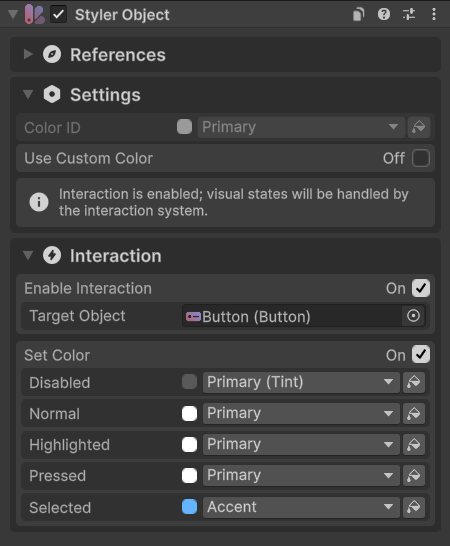
Usage
Add Styler Object to the UI element.
Choose the matching object type (e.g. Text).
Assign the corresponding target reference.
Keep Use Default Preset on to follow the default preset, or turn it off to assign a preset.
Enter the IDs to apply, such as a color ID and a font ID.
Tips
Target Types
Graphic applies color; Text applies font, text style, and color to a text component of any text provider; Image can apply a sprite and color; Gradient targets Image Gradient. Procedural Shape also has its own native Shape Style and per-layer color mappings.
Interaction
Enable Interaction and assign the Selectable that supplies the state. Configure Disabled, Normal, Highlighted, Pressed, and Selected colors, and enable font interaction when needed. Each color mapping can override alpha independently.
Local Overrides
Use Custom Color bypasses the preset color for this object. Override Alpha changes opacity while keeping the resolved color.
Public API
Use StylerObject in the Evo.UI namespace.
Set useDefaultStylerPreset to false before assigning a custom Preset. While it is on, the object resolves the configured default in the editor. Assigning a different Preset updates the object automatically; call UpdateStyler() after changing IDs, mappings, or interaction settings.
Properties
| Name | Type | Description |
|---|---|---|
Preset | StylerPreset | Preset asset used by this handler. |
Fields
| Name | Type | Description |
|---|---|---|
useDefaultStylerPreset | bool | Locks the preset to the current default Styler Preset. |
objectType | ObjectType | Graphic, Text, Image, or Gradient. |
targetGraphic | Graphic | Graphic or Image target. |
targetText | Graphic | Text target, from any text provider. |
targetGradient | ImageGradient | Image Gradient target. |
colorID | string | Color entry ID. |
fontID | string | Font entry ID. |
textStyleID | string | Text Style entry ID. |
spriteID | string | Sprite entry ID. |
gradientID | string | Gradient entry ID. |
useCustomColor | bool | Bypasses the preset color. |
overrideAlpha | bool | Enables a base color alpha override. |
alphaOverride | float | Replacement opacity from 0 to 1. |
enableInteraction | bool | Enables state-based styling. |
interactableObject | Selectable | Selectable that supplies the current state. |
enableColorInteraction | bool | Applies state color mappings. |
enableFontInteraction | bool | Applies state font mappings. |
Methods
| Name | Parameters | Description |
|---|---|---|
UpdateStyler() | None | Refreshes targets and applies current settings. |
GetAvailableColorIDs() | None | Lists color IDs in the preset. Returns List<string>. |
GetAvailableFontIDs() | None | Lists font IDs in the preset. Returns List<string>. |
GetAvailableTextStyleIDs() | None | Lists Text Style IDs. Returns List<string>. |
GetAvailableSpriteIDs() | None | Lists Sprite IDs. Returns List<string>. |
GetAvailableGradientIDs() | None | Lists Gradient IDs. Returns List<string>. |
Example
using UnityEngine;
using Evo.UI;

public class StylerObjectExample : MonoBehaviour
{
    [SerializeField] private StylerObject target;
    [SerializeField] private StylerPreset theme;

    private void Start()
    {
        target.useDefaultStylerPreset = false;
        target.Preset = theme;
        target.colorID = "Accent";
        target.overrideAlpha = true;
        target.alphaOverride = 0.8f;
        target.UpdateStyler();
    }
}