
Styler Preset
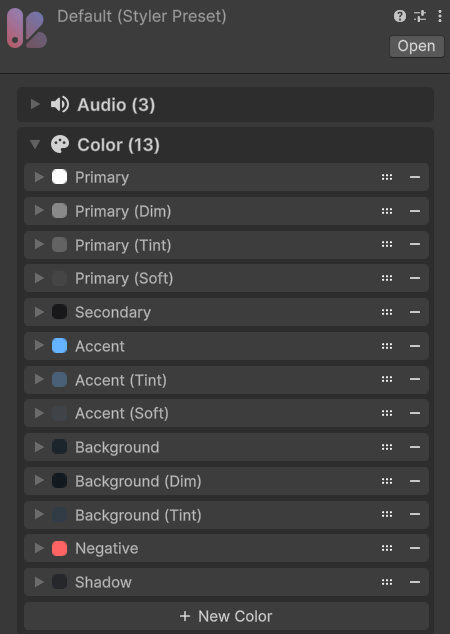
Store reusable theme values in a StylerPreset asset
Overview
A StylerPreset asset holds the values shared by your UI. Components request entries by ID, which lets you create theme variants without changing each component’s references.
Usage
In the Project window, choose Create -> Evo -> UI -> Styler Preset.
Add entries for your colors, fonts, audio, sprites, gradients, text styles, and shape styles.
Customization
Entry Types
| Type | Typical use |
|---|---|
| Audio | Hover, click, open, and close sounds. |
| Color | Text, surfaces, outlines, and state colors. |
| Font | A font for each text provider, such as a TextMesh Pro font asset and a UniText font stack. |
| Gradient | Shared color gradients. |
| Sprite | Reusable images and icons. |
| Text Style | Typography settings shared by text labels. |
| Shape Style | Procedural Shape appearance. |
Fonts
A Font entry holds one font per text provider. With only TextMesh Pro installed, it shows a single Font Asset field; with UniText installed, it shows a TextMesh Pro and a UniText field. Components use the font that matches their text's provider, so one Font ID works with every provider. Font entries also pair fonts when converting existing text.
Shape Styles
A Shape Style’s Applies To flags select Graphic, Shape, Fill, Outline, Inner Shadow, and Outer Shadow groups. Use only the groups a style should own; the other settings stay local.
Keep On Global Apply
Turn on Keep On Global Apply under Settings for a preset that should not follow theme changes, such as a screen with its own look. Objects using this preset keep it when Styler.ApplyPreset() switches the theme, and they don't inherit Styler.PersistentPreset when enabled later. Styler.ApplyPresetTo() still changes them.
Managing Presets
Keep IDs consistent across themes. Use the Browser's ID Migrator when renaming entries that are already in use. Save user preferences separately; runtime preset changes do not save them for the next session.
Public API
Use StylerPreset in the Evo.UI namespace. Prefer TryGet...() when an entry may be absent.
Fields
| Name | Type | Description |
|---|---|---|
audioItems | List<Styler.AudioItem> | Named audio entries. |
colorItems | List<Styler.ColorItem> | Named colors. |
fontItems | List<Styler.FontItem> | Named fonts, with fontAsset for TextMesh Pro and providerFonts for other providers. |
gradientItems | List<Styler.GradientItem> | Named gradients. |
spriteItems | List<Styler.SpriteItem> | Named sprites. |
textStyleItems | List<Styler.TextStyleItem> | Named text styles. |
shapeStyleItems | List<Styler.ShapeStyleItem> | Named Procedural Shape styles. |
updateMode | Styler.UpdateMode | Adaptive or Always update behavior. |
keepOnGlobalApply | bool | Keeps objects on this preset when another preset is applied globally or inherited from PersistentPreset. |
Methods
| Name | Parameters | Description |
|---|---|---|
TryGetColor() | string itemID, out Color color | Looks up a color and reports whether the ID exists. Returns bool. |
GetColor() | string itemID | Returns the color for an ID. Returns Color. |
SetColor() | string itemID, Color color | Sets an entry's color, adding the entry if it is missing. |
AddColor() | string itemID, Color color | Adds a named color. |
RemoveColor() | string itemID | Removes a color and reports success. Returns bool. |
TryGetFont() | string itemID, TextBackend backend, out Object font | Looks up the entry's font for a text provider. The font is null when the entry has none for it. Returns bool. |
GetFont() | string itemID, TextBackend backend | Returns the entry's font for a text provider, or null. Returns Object. |
SetFont() | string itemID, TMP_FontAsset font | Sets an entry's TextMesh Pro font, adding the entry if it is missing. |
TryGetShapeStyleItem() | string itemID, out Styler.ShapeStyleItem shapeStyleItem | Looks up a Shape Style entry. Returns bool. |
GetShapeStyleItem() | string itemID | Returns a Shape Style entry. Returns Styler.ShapeStyleItem. |
AddShapeStyle() | string itemID | Adds a Shape Style with the given ID. |
RemoveShapeStyle() | string itemID | Removes a Shape Style. Returns bool. |
TryGetTextStyleItem() | string itemID, out Styler.TextStyleItem textStyleItem | Looks up a Text Style entry. Returns bool. |
AddTextStyle() | string itemID | Adds a Text Style. |
RemoveTextStyle() | string itemID | Removes a Text Style. Returns bool. |
Example
using UnityEngine;
using Evo.UI;

public class StylerPresetExample : MonoBehaviour
{
    [SerializeField] private StylerPreset sourcePreset;
    [SerializeField] private GameObject panel;
    private StylerPreset runtimePreset;

    private void Start()
    {
        runtimePreset = Instantiate(sourcePreset);
        if (runtimePreset.TryGetColor("Accent", out var accent))
        {
            runtimePreset.SetColor("Accent", accent * 0.8f);
            Styler.ApplyPresetTo(runtimePreset, panel, true, 0.2f);
        }
    }

    private void OnDestroy()
    {
        // Keep the clone alive for as long as the panel uses it.
        if (runtimePreset != null)
            Destroy(runtimePreset);
    }
}