
Icons
Browse Lucide-based icons and assign them to your UI
Overview
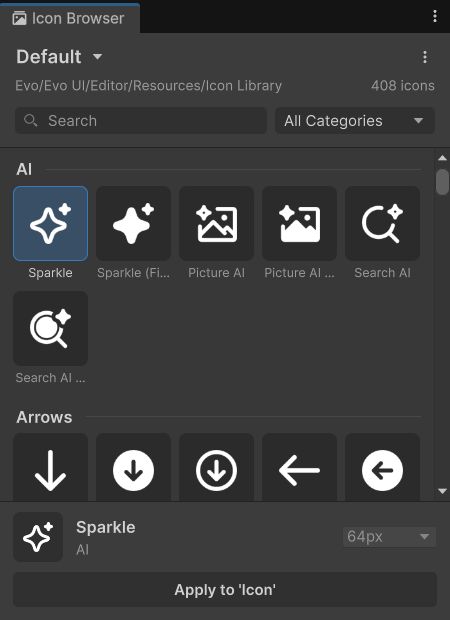
Evo UI includes a complete icon set with a growing library of over 345 clean UI icons. The Icon Browser lets you search, preview, and assign the available sprites without searching through folders manually.
Usage
Open Tools -> Evo UI -> Icon Browser.
Select an Icon Library, then search or filter by category.
Preview the icon and choose an available resolution.
Select a supported UI object and apply the icon.
You can preview icons without selecting an object. Application supports Image, RawImage, Procedural Shape, and Evo UI Button.
Icon Library
An Icon Library stores IDs, categories, and Sprite references at different resolutions. Create one with Create -> Evo -> UI -> Icon Library. Use your own asset when extending the supplied collection.
The library importer can scan folders, derive categories and IDs, and add discovered resolutions. Review its clear-before-import option before updating an existing library.
Please keep in mind that this is an editor only tool.
Resolution and Appearance
Choose an available resolution appropriate for the displayed size and inspect the texture’s import settings. The browser reports resolutions present in that library; do not assume every custom icon has the same sizes.