
Topographic Skin
Draw animated contour lines on a UI image
Overview
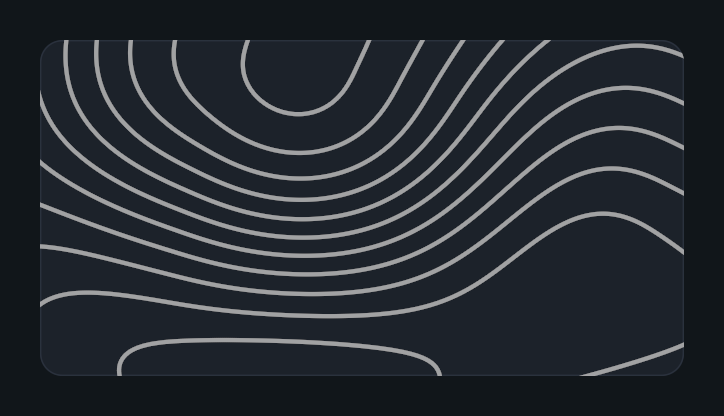
Topographic Skin draws procedural contour lines, like the height lines of a map. The pattern slowly evolves over time without an animated texture. Use it for backgrounds, cards, and decorative surfaces.
Usage
Add Topographic Skin to a UI rectangle under a Canvas. The component is an Image, so it does not need a separate Image component.
Set the graphic Color to choose the line color. Assign a Source Image to shape the pattern, for example a rounded or sliced sprite.
Adjust Scale, Density, and Seed in Pattern, then Line Width in Lines.
Set Speed in Animation to control how fast the contours evolve.
Customization
- Scale sets the size of the landforms. Higher values spread the same contours over a bigger area.
- Density sets the number of contour levels. Higher values pack the lines closer together.
- Seed selects a different part of the pattern.
- Line Width and Major Line Width use canvas units, so every line keeps the same width along its whole length.
- Major Line Every draws every Nth contour as a major line, like the index contours of a map. Set it to 0 to disable major lines.
- Edge Softness sets the antialiasing width in screen pixels. Raise it for softer, glowing lines.
- Lower Speed values give a calmer background that competes less with foreground content. Set it to 0 for a static pattern.
Notes
The pattern is attached to the graphic. It moves, scales, and rotates with the RectTransform, so panels can slide or animate without the lines drifting inside them.
The pattern evolves in Edit Mode and uses unscaled time at runtime, so it keeps moving when Time.timeScale is 0.
A custom material owns its own settings. Clear Material to use the component's controls.
Public API
Use TopographicSkin in the Evo.UI namespace. Its properties update the graphic automatically.
Properties
| Name | Type | Description |
|---|---|---|
Scale | float | Landform size, from 0.1 to 10. |
Density | float | Number of contour levels, from 1 to 100. |
Seed | float | Pattern variation, from 0 to 100. |
LineWidth | float | Contour line width in canvas units, from 0.1 to 20. |
MajorLineInterval | int | Draws every Nth contour as a major line, from 0 to 10. 0 disables major lines. |
MajorLineWidth | float | Major contour line width in canvas units, from 0.1 to 20. |
EdgeSoftness | float | Antialiasing width in screen pixels, from 0.1 to 4. |
Speed | float | Unscaled evolution speed, from 0 to 1. |
Example
using UnityEngine;
using Evo.UI;

public class TopographicSkinExample : MonoBehaviour
{
    [SerializeField] private TopographicSkin target;

    private void Start()
    {
        target.Scale = 1.5f;
        target.Density = 24f;
        target.LineWidth = 2f;
        target.MajorLineInterval = 5;
        target.Speed = 0.01f;
        target.raycastTarget = false;
    }
}