
UI Elements
Counter
Animate numeric labels with rolling digits
Overview
Counter animates changes to a numeric label. Featuring rolling digits, with controls for stagger, travel distance, and fading.
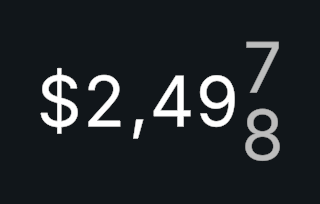
Usage
Add Counter to an object and assign its text component. Any text provider works.
Set the initial value and display format.
Call SetValue() for an animated change or SetValueInstant() for immediate updates.
Tips
- Use Roll Through Digits to roll through intermediate digits.
- Counter Duration, Minimum Step Duration, and Digit Stagger shape the timing; Roll Distance and Fade Amount control the appearance.
- Use Unscaled Time lets the animation continue while gameplay is paused.
- Use Uniform Digit Width stops changing digits from shifting the number. With TextMesh Pro, it requires Rich Text on the text, and Digit Width Scale adjusts the measured digit width. UniText uses the font's tabular figures instead.
Public API
Use Counter in the Evo.UI namespace.
value stores the target number and CurrentValue reports the displayed number during animation. Use SetValue() or SetValueInstant() to update the display.
Properties
| Name | Type | Description |
|---|---|---|
CurrentValue | float | Read-only displayed value during animation. |
IsAnimating | bool | Whether an animation is running. |
Fields
| Name | Type | Description |
|---|---|---|
value | float | Target numeric value. |
displayFormat | NumberDisplayFormat | Shared number format. |
textFormat | string | Text template containing 0. |
rollThroughDigits | bool | Rolls through intermediate digits. |
counterDuration | float | Base duration of the change. |
digitStagger | float | Delay between digit animations. |
Methods
| Name | Parameters | Description |
|---|---|---|
SetValue() | float newValue | Animates toward the new value. |
SetValue() | int newValue | Animates toward the new value. |
SetValueInstant() | float newValue | Displays the new value immediately. |
SetValueInstant() | int newValue | Displays the new value immediately. |
AddToValue() | float amount | Adds to the target value and animates. |
SubtractFromValue() | float amount | Subtracts from the target value and animates. |
Example
using UnityEngine;
using Evo.UI;

public class CounterExample : MonoBehaviour
{
    [SerializeField] private Counter target;

    private void Start()
    {
        target.SetValueInstant(0);
        target.textFormat = "Score: {0}";
        target.SetValue(1250);
    }
}