
UI Elements
Range Slider
Select a lower and upper value with two handles
Overview
Range Slider selects an interval rather than a single value. It works well for price filters, level ranges, and minimum/maximum settings.
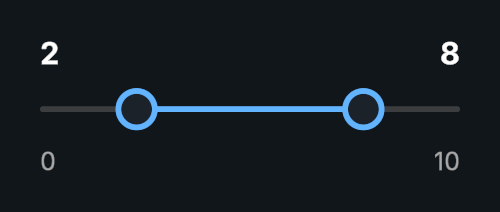
Usage
Create a Range Slider prefab and set the overall Min Value and Max Value.
Set the lower and upper values.
Choose Min Gap to keep the handles apart, and Push Other Handle if dragging one should move the other.
Bind On Value Changed to a method accepting both values.
Tips
- Both handles have optional text and input fields.
- Whole Numbers, Display Format, and Text Format control numeric presentation.
ActiveHandlelets you choose which handle responds to navigation.- Use
SetValues()to change both ends together. Values stay ordered and respect the range and minimum gap. The change event supplies the lower value first.
Public API
Use RangeSlider in the Evo.UI namespace.
Properties
| Name | Type | Description |
|---|---|---|
LowerValue | float | Lower endpoint. |
UpperValue | float | Upper endpoint. |
MinValue | float | Minimum allowed value. |
MaxValue | float | Maximum allowed value. |
MinGap | float | Minimum distance between endpoints. |
WholeNumbers | bool | Rounds endpoints to integers. |
ActiveHandle | Handle | Lower or Upper handle used for navigation. |
Direction | Direction | Direction of the slider. |
Fields
| Name | Type | Description |
|---|---|---|
pushOtherHandle | bool | Allows a dragged handle to push the other endpoint. |
Methods
| Name | Parameters | Description |
|---|---|---|
SetValues() | float lower, float upper | Sets both endpoints and invokes the value event. |
SetValuesWithoutNotify() | float lower, float upper | Sets both endpoints without notifying listeners. |
SetLowerValueWithoutNotify() | float value | Updates only the lower endpoint without an event. |
SetUpperValueWithoutNotify() | float value | Updates only the upper endpoint without an event. |
Refresh() | None | Refreshes layout and visuals. |
Events
| Name | Type | Description |
|---|---|---|
onValueChanged | UnityEvent<float, float> | Invoked with lower and upper values. |
Example
using UnityEngine;
using Evo.UI;

public class RangeSliderExample : MonoBehaviour
{
    [SerializeField] private RangeSlider target;

    private void Start()
    {
        target.MinValue = 0f;
        target.MaxValue = 100f;
        target.MinGap = 10f;
        target.SetValuesWithoutNotify(20f, 80f);
        target.onValueChanged.AddListener(OnRangeChanged);
    }

    public void ResetRange()
    {
        // Change both handles together and notify listeners.
        target.SetValues(20f, 80f);
    }

    private void OnRangeChanged(float lower, float upper)
    {
        Debug.Log($"Range: {lower}–{upper}");
    }

    private void OnDestroy()
    {
        if (target != null)
            target.onValueChanged.RemoveListener(OnRangeChanged);
    }
}