
UI Elements
Radial Slider
Adjust a value around a circular track
Overview
Radial Slider maps a numeric range to an arc. Use it for knobs, circular progress controls, and settings that benefit from a compact dial.
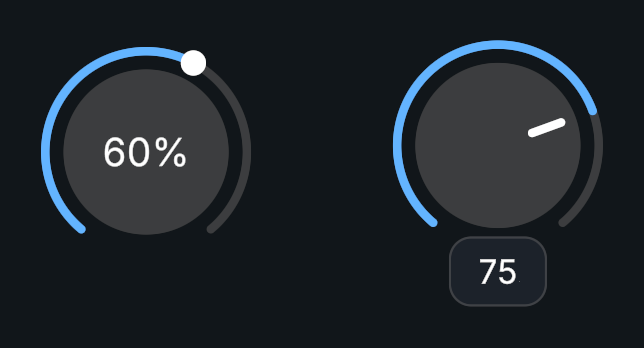
Usage
Create a Radial Slider prefab.
Set the value range, start angle, and angle range.
Assign its handle and Procedural Shape fill.
Bind On Value Changed to receive the actual value.
Tips
- Choose clockwise or counterclockwise movement and enable continuous drag if the pointer should pass smoothly across the angular boundary.
- Value text supports
NumberDisplayFormat, a display multiplier, and a text template.
Public API
Use RadialSlider in the Evo.UI namespace.
Value uses the configured numeric range; NormalizedValue uses 0–1.
Properties
| Name | Type | Description |
|---|---|---|
Value | float | Current value, clamped to the range. |
NormalizedValue | float | Value expressed from 0 to 1. |
MinValue | float | Lower bound. |
MaxValue | float | Upper bound. |
WholeNumbers | bool | Rounds to whole numbers. |
Fields
| Name | Type | Description |
|---|---|---|
angleRange | float | Size of the interactive arc in degrees. |
startAngle | float | Angle where the arc starts. |
clockwise | bool | Direction in which values increase. |
continuousDrag | bool | Allows continuous angular dragging. |
fillImage | ProceduralShape | Procedural Shape used for the fill. |
Methods
| Name | Parameters | Description |
|---|---|---|
SetValueWithoutNotify() | float input | Changes the value without invoking its event. |
Refresh() | None | Refreshes references and visuals. |
Events
| Name | Type | Description |
|---|---|---|
onValueChanged | UnityEvent<float> | Invoked with the actual numeric value. |
Example
using UnityEngine;
using Evo.UI;

public class RadialSliderExample : MonoBehaviour
{
    [SerializeField] private RadialSlider target;

    private void Start()
    {
        target.MinValue = 0f;
        target.MaxValue = 100f;
        target.Value = 35f;
        target.onValueChanged.AddListener(value => Debug.Log($"Dial: {value}"));
    }

    public void SetHalfway()
    {
        target.NormalizedValue = 0.5f; // Equivalent to Value = 50 in this range.
    }
}