
Slider
A Unity slider with formatted values and interaction feedback
Overview
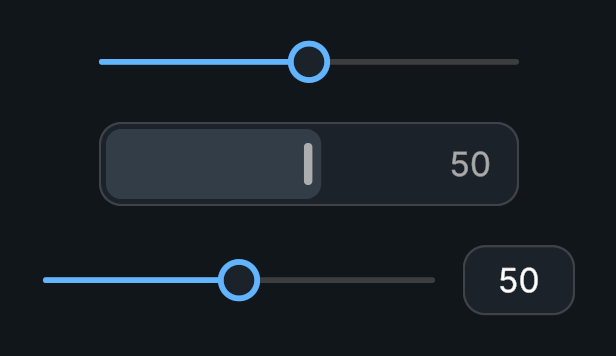
Evo UI Slider extends Unity’s Slider with a formatted value label, optional numeric input, and animated handle feedback. Its value and range API still comes from Unity’s Slider.
Usage
Create a Slider prefab.
Set Min Value, Max Value, and Whole Numbers as needed.
Assign the optional value text and input field.
Bind On Value Changed to the setting you want to control.
Customization
- Display Multiplier changes the displayed number without changing the stored value.
- For a 0–1 volume setting, use a multiplier of 100 and a text format of
{0}%. - Choose precision through the shared
NumberDisplayFormatenum.
Public API
Use Slider in the Evo.UI namespace.
Fields
| Name | Type | Description |
|---|---|---|
displayMultiplier | float | Multiplier applied only when formatting the label. |
displayFormat | NumberDisplayFormat | Number formatting and decimal precision. |
textFormat | string | Text template containing 0. |
valueText | Graphic | Optional display text, from any text provider. |
valueInput | MonoBehaviour | Optional editable numeric input field, from any text provider. |
Methods
| Name | Parameters | Description |
|---|---|---|
SetText() | float val | Refreshes the value label and input for a value. |
GetFormattedText() | float sValue | Returns formatted display text. Returns string. |
Events
| Name | Type | Description |
|---|---|---|
OnStateChanged | Action<InteractionState> | Reports the current interaction state. |
Inherited API
Use value, normalizedValue, minValue, maxValue, wholeNumbers, onValueChanged, and SetValueWithoutNotify(float) from UnityEngine.UI.Slider.
Assigning value updates the control and invokes onValueChanged when the value changes. SetValueWithoutNotify() updates the control without firing that event. Both update Evo UI's value text.
Example
using UnityEngine;
using Evo.UI;

public class SliderExample : MonoBehaviour
{
    [SerializeField] private Slider slider;

    private void Start()
    {
        slider.minValue = 0f;
        slider.maxValue = 1f;
        slider.wholeNumbers = false;
        slider.displayMultiplier = 100f;
        slider.textFormat = "{0}%";

        // Restore a setting without triggering callbacks.
        slider.SetValueWithoutNotify(0.75f);
        slider.onValueChanged.AddListener(OnVolumeChanged);
    }

    public void ResetVolume()
    {
        slider.value = 0.5f; // Shows 50% and notifies listeners if changed.
    }

    private void OnVolumeChanged(float volume)
    {
        Debug.Log($"Volume: {volume}"); // Stored value is still 0–1.
    }

    private void OnDestroy()
    {
        if (slider != null)
            slider.onValueChanged.RemoveListener(OnVolumeChanged);
    }
}